



You no longer need to search for templates in Word or PDF and fill them in manually. The form on troco.ro guides you step by step, and the final document is ready for immediate use.
Download the 2026 auto sale-purchase contract template (PDF or Word)
You can download the auto sale-purchase contract template in PDF or Word format if you prefer manual completion instead of the online form.
✔ Download auto sale-purchase contract 2026 model (ITL 054) – fillable PDF
✔ Download auto sale-purchase contract 2026 model (ITL 054) – Word (DOC)
What changed on August 17, 2026
Since August 17, 2026, a new form has been used: the 2026 ITL 054 model, officially named the “contract for the disposal and acquisition of a means of transport”. It was approved by Joint Order no. 772/966/123/2026 and fully replaces the 2016 model. Be careful: many websites have added “2026” to their titles but still provide the old form.
The 2026 ITL 054 model updates the old form and introduces several important changes:
- Cartridge D — the buyer's tax-status check. Following Emergency Ordinance 7/2026, the buyer must also have no outstanding local tax debts. The Directorate of Taxes and Duties certifies the buyer's tax status directly on the contract, so a separate tax-clearance certificate is no longer required.
- Expanded identity documents. The new form allows the parties to be identified using a BI, CI, CEI, CIS, CIP or passport.
- Field for electric vehicles. The technical field is now labelled “engine capacity/kW”, allowing it to be completed correctly for electric vehicles as well.
- The transfer deadline is displayed correctly. The form states the legal deadline of no more than 90 days. The old model displayed 30 days, although the deadline had been changed in 2017.
How to recognize the new model in 10 seconds
Check these four elements before completing the contract:
- the header contains the name “2026 ITL 054 Model”;
- the form includes cartridge D for the buyer's tax status;
- point (5) states “no more than 90 days”;
- the identity-document list includes the new document types.
If any of these are missing, you are looking at the old form. The model on this page—both the one completed online and the downloadable versions—is the new one.
What is an auto sale-purchase contract and when is it mandatory
The auto sale-purchase contract represents the official proof of the transaction between two parties. Through it, the seller transfers the ownership right of the car, and the buyer pays the agreed price.
From the moment it is signed, the buyer becomes the owner both in law and in fact—this is stated in the contract itself.
The document is required for:
- tax registration of the vehicle in the name of the new owner;
- tax deregistration of the former owner;
- transfer of ownership at DRPCIV;
- proving the transaction date in case of fines.
Between individuals, this contract is generally used. When the seller is a business (dealer, company or PFA), the sale is usually made on the basis of an invoice—see the “Contract or invoice” section below for details.
On this page you can fill in the auto sale-purchase contract online, and the document is automatically generated and can be downloaded in PDF format, ready to print.
If you prefer manual completion, the auto sale-purchase contract template can be downloaded in Word (DOC) or PDF format, the version used for registration.
Auto sale-purchase documents: what to check before signing
Before completing the contract, it is essential to verify the original documents of the car. Missing or inconsistent documents can block registration later.
Documents you need:
- original vehicle identity card (CIV);
- registration certificate;
- identity documents of the parties;
- valid RCA (if there is no valid insurance, the new owner cannot leave with the car, an RCA policy for registration can be made using our RCA calculator on the website);
- ITP (technical inspection) proof;
- complete data: name, CNP, ID series (for individuals) or company name and Trade Register number (for companies).
RAR Auto-Pass is obtained exclusively online from the official Romanian Automotive Register platform. It helps you avoid cars with altered mileage or issues in their history.
Document summary:
| Document | Purpose | Required at signing |
|---|---|---|
| Vehicle Identity Card (CIV) | Technical identification (VIN, engine, chassis number) | Yes |
| Registration Certificate | Proof of current registration | Yes |
| Party Identity Documents | Data for completing the contract | Yes |
| RCA Policy | Proof of valid insurance | Only to be able to leave with the car |
| ITP | Technical inspection validity | Only to be able to leave with the car |
| RAR Auto-Pass | Official vehicle history (mandatory for sales since December 2024) | Yes — provided by the seller |
Remember: any discrepancy between the CIV data and those entered in the contract (for example, a wrong letter in the VIN) can lead to rejection of the file at DRPCIV.
How to complete the sale-purchase contract form on troco.ro
To generate the auto sale-purchase contract on troco.ro, it is recommended to have the necessary documents at hand before starting to fill in the form. The process is simple and structured in a few clear steps.
1. Fill in the seller's data
In the first step, take the seller's identity card and enter all the requested information in the form. Fields marked with an asterisk (*) are mandatory and must be completed to continue generating the contract. Carefully check the correctness of the name, CNP and address.
2. Fill in the buyer's data
In the next step, use the buyer's identity card and complete all mandatory fields marked with an asterisk. Enter the data exactly as it appears in the official document to avoid errors in the final contract.
3. Enter the vehicle data
Then take the car's registration certificate and fill in the vehicle information. The requested data includes the make, model, registration number and chassis number (VIN). It is important that this information matches the vehicle documents.
4. Complete the final transaction details
In the last step, enter the car's sale price, the contract date and the location where the document will be signed. After verifying all the information entered, you can instantly generate the auto sale-purchase contract in PDF format, ready to print and sign by both parties.
What to do after completing the auto sale-purchase contract
1. Printing and signing the contract
The auto sale-purchase contract must be printed in 5 copies (4 copies if the acquiring party does not have tax domicile in Romania) and signed by the seller and buyer.
The distribution of the 5 copies is, in practice:
- 1 copy – seller
- 1 copy – buyer
- 1 copy – seller's tax administration
- 1 copy – buyer's tax administration
- 1 copy – DRPCIV (for registration)
It is important to know that the tax stamp is applied at the local administration where the vehicle is initially registered. Notarial authentication is not required for the contract to be valid.
2. Seller's tax visa (cartridges A and B)
After signing, the contracts are submitted to the seller's local Directorate of Taxes and Duties, where the vehicle is registered. The official confirms the seller's tax status and removes the car from the seller's tax records, completing cartridges A and B directly on the contract.
Without it, the buyer can neither declare the vehicle nor transfer its registration.
In practice, two common situations arise:
If the seller and buyer go together to the tax office on the day of sale
In this case, all 5 copies of the contract can receive the tax visa on the spot, and the documents are distributed immediately between the parties.
If the seller and buyer are from different localities
The contract is signed in 5 copies, but:
- 4 copies remain with the seller, to go to the tax administration and obtain the tax visa;
- 1 copy remains with the buyer, as proof of the transaction.
After cartridges A and B are completed, the seller sends the buyer the copies needed to continue the registration procedure.
3. Declaring the car and checking the buyer (cartridges C and D — new in 2026)
Within a maximum of 30 days from signing, the buyer declares the car at the Directorate of Taxes and Duties in their locality of residence. At the same time, the new 2026-model procedure applies: the official also checks the buyer's tax status (electronically or, where this is not possible, using a tax-clearance certificate) and completes cartridges C and D directly on the contract—you do not need a separate certificate.
Pay attention to a detail that almost nobody explains: the law requires the buyer to have no outstanding local-budget debts (taxes or fines) on the first day of the month following the signing. If you have outstanding debts, pay them before that date—otherwise the contract may be null and void (Emergency Ordinance 7/2026). Example: if you sign on August 21, you must be fully up to date by September 1.
4. Taking out RCA insurance
To be able to legally drive the vehicle and to finalize the registration process, the buyer must take out an RCA policy for registration.
RCA insurance is mandatory for all registered vehicles or those to be registered.
Calculate the RCA price online and compare insurers' offers:
5. Transfer of ownership at DRPCIV
The last step is the transfer of ownership in the registration certificate, at the registration service (DRPCIV).
After submitting the necessary documents and processing the application, the car's registration certificate will be issued in the name of the new owner.
Important legal deadlines
- The buyer must register the vehicle for tax within a maximum of 30 days.
- Transfer at DRPCIV must be made within a maximum of 90 days.
- The seller must declare the transfer to the competent Directorate of Taxes and Duties within 30 days from the date of the contract (Article 471 of the Fiscal Code).
The most common mistake is seeing “90 days” on the contract and assuming that deadline applies to everything. The deadline at the Directorate of Taxes and Duties remains 30 days.
Exceeding these deadlines can generate fines or situations where the former owner receives penalties for acts committed after the sale.
Auto sale-purchase contract vs. invoice – important differences
Confusion between these documents is frequent. The differences are essential for the validity of the ownership transfer:
Auto sale-purchase contract
It is used when the car is sold between individuals. The contract establishes the transfer of ownership of the vehicle.
The 2026 form may also be used by legal entities (it includes fields for “The undersigned entity”, C.I.F. and representative).
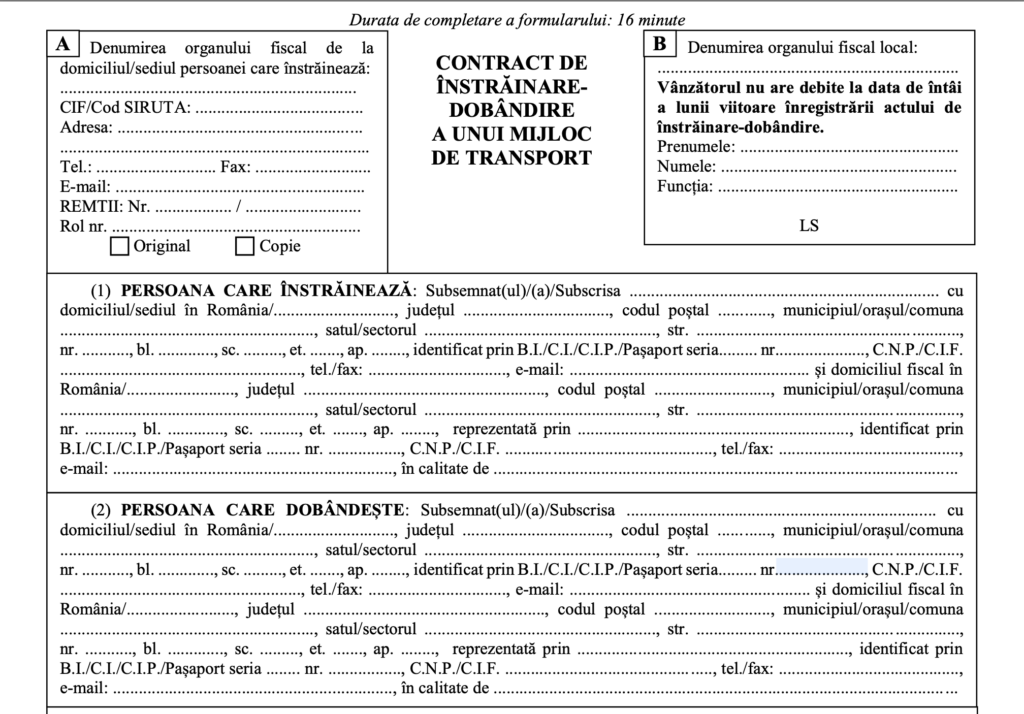
Example of a sale-purchase contract for a means of transport used for car sales between individuals.
Auto sale invoice
It is used when the seller is a company (dealer, commercial company or PFA). In this case, the invoice replaces the contract and represents the sales document.
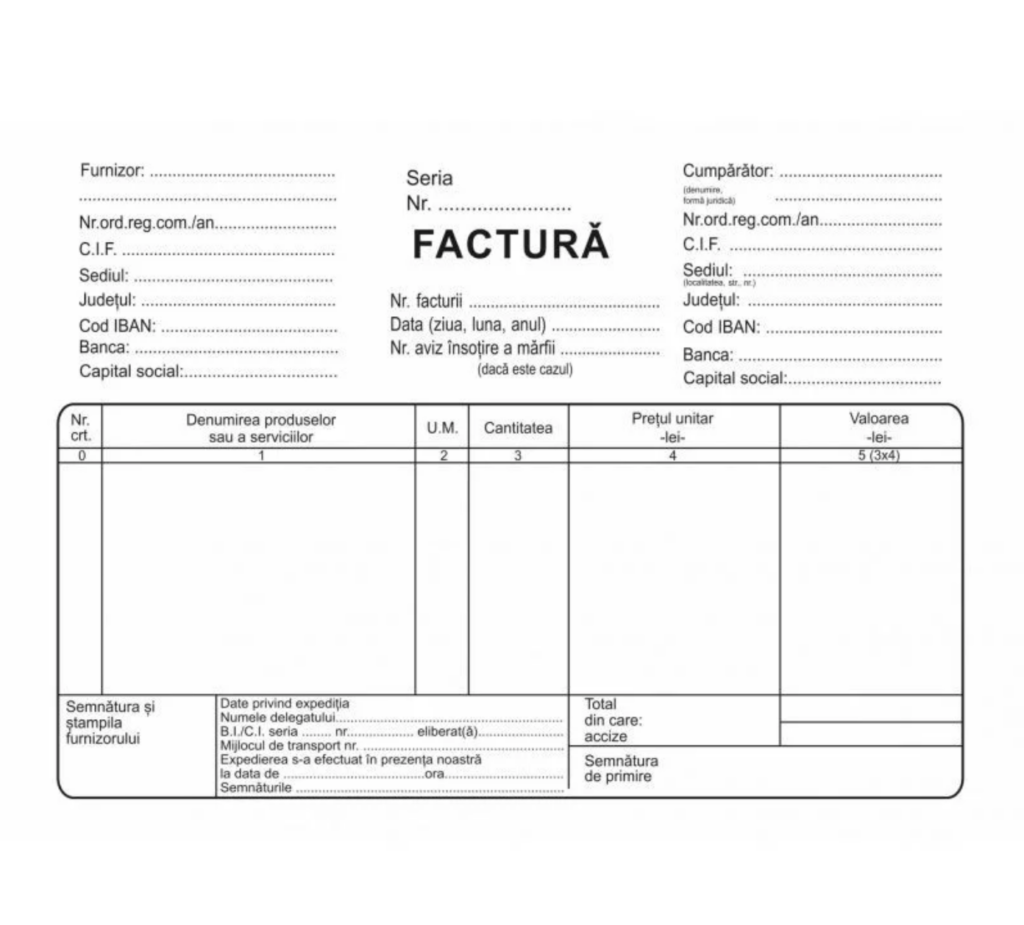
Invoice template used for the sale of a car by a company or auto dealer.
Main difference
- Contract → sale between individuals
- Invoice → sale made by a company
Regardless of the document used, the parties' tax-status checks (the visa on the contract and the certification upon declaration, respectively) apply in both cases.
Common mistakes that can void the auto sale-purchase contract
Many conflict situations arise from easily avoidable errors. Here are the most common:
- Using the old form (2016 model) – Directorates of Taxes and Duties work with the 2026 ITL 054 model; using the old form may force you to redo the documents from scratch.
- Under-declared price – declaring a fictitious lower price can lead to nullity of the contract and sanctions under Article 1665 of the Civil Code (fictitious or derisory price → nullity of the sale).
- Wrong data – error in CNP, name or VIN blocks registration.
- Unmentioned mileage – the lack of this mention makes it difficult to prove any fraud.
- Buyer's debts – if the buyer has outstanding local-budget debts on the first day of the month following the signing, the contract may be null by operation of law (Emergency Ordinance 7/2026).
- Missing seller's tax visa – without cartridges A/B completed, you cannot declare the vehicle or transfer its registration (ownership transfers upon signing, but the administrative process remains blocked).
Frequently asked questions about the auto sale-purchase contract
Where can I find an auto sale-purchase contract template in Word or PDF?
The standard template can be downloaded in PDF or Word (DOC) format. Alternatively, you can fill in the contract directly online on troco.ro and download it automatically in PDF format.
How many copies of the auto sale-purchase contract must be signed?
Usually 5 copies are signed: for the seller, buyer, tax administrations and the registration file at DRPCIV. Only 4 are needed if the acquiring party does not have tax domicile in Romania.
Is the fiscal mandatory on the auto contract?
Yes. The seller's Directorate of Taxes and Duties completes cartridges A/B, and the buyer's directorate completes cartridges C/D. Without these visas, you cannot declare the car or transfer its registration.
Is the auto sale-purchase contract done at the notary?
No. The contract does not need to be notarized. It is enough to be correctly completed, signed by the parties and registered at the tax administration.
Is it mandatory to enter the mileage in the contract?
It is not mandatory in all templates, but it is recommended to avoid any disputes regarding the actual mileage of the car.
Can I sell the car without ITP or RCA?
Yes, the contract can be signed. However, without valid ITP or RCA, the car cannot legally drive on public roads.
What is the deadline for transferring the car to the new owner's name?
The buyer must make the transfer at DRPCIV within a maximum of 90 days from the purchase date. However, declaration at the Directorate of Taxes and Duties remains subject to a 30-day deadline.
What do I do if I receive a fine after selling the car?
You can file a contravention complaint within 15 days, attaching the sale-purchase contract that proves the date of transfer.
Is the 2016 auto contract model still valid?
Contracts signed before August 17, 2026 using the 2016 model remain valid. For new transactions, however, the 2026 ITL 054 model, approved by Joint Order no. 772/966/123/2026, must be used — the tax authorities work with the updated form. The model on this page is the new one.
Can I make an auto sale-purchase contract online?
Yes. The online form on troco.ro automatically generates the completed contract in PDF format, ready to print and sign.
Does the buyer need a tax-clearance certificate?
With the 2026 model, a separate certificate is no longer needed: when the car is declared, the Directorate of Taxes and Duties checks the buyer's tax status (usually electronically) and completes cartridge D directly on the contract. The legal condition is that there must be no outstanding debts on the first day of the month following the signing—otherwise the contract risks being null and void (Emergency Ordinance 7/2026).
Conclusion: how to ensure the transfer is correct and risk-free
An auto sale-purchase contract completed correctly on the 2026 form, endorsed by the Directorate of Taxes and Duties and registered within the deadlines (30 days for declaration, 90 days at DRPCIV), ensures a legal transfer without surprises. The most common problems arise from using the old form, inattention to data, omission of the tax stamp or postponement of formalities.
After completing the transfer, the new owner must take out an RCA policy in their name to be able to drive legally. If you want to quickly see what options are available on the market, you can use our insurance calculator to compare offers in a few clicks and choose the option that suits your situation.